BE IN CONTROL OF YOUR TRANSFORMATION
Enterprise Architecture Blueprint
Create your own architecture artefact using Dragon1 Software. AI Powered.
Browse Library
Select Template
Create Blueprint
Example of a Blueprint Architecture with an overview of the dependencies and risks
What is an Enterprise Architecture Blueprint Diagram?
An Architecture Blueprint is a 2d or 3d visualization of the architecture at the conceptual, logical, and physical levels of an enterprise, showing concepts, their elements, the components that implement the elements, and their interrelationships.
Enterprise Architecture Blueprints / Architecture Blueprints are the most popular diagrams and help manage risks in complex business changes and programs, such as digital transformation.
- Speed up Results You can have your version of the architecture blueprint in just a day by only updating the example.
- Dynamic Visualizations If you change model data, the visualization template is automatically updated.
- Repository Collaboration You can be productive as a team working together on innovative enterprise architecture blueprint examples.
- Increase Efficiency of people and groups by deduplication of work and reuse of information.
- Work Anytime, anyplace, anywhere on any device.
Why Create Architecture Blueprints? - The Added Value
Addressing Business Outcome Related Benefits
Creating an Enterprise Architecture Blueprint example is only sensible if it has many direct benefits for the company. Four benefits of creating a blueprint directly impact certain business outcomes. These are:
| Benefits* | Business Outcomes* |
| Giving an overview of the enterprise layers, their building blocks, and their interdependencies |
Increase the capability for the business to prioritize |
| Communicating the status of strategy & operations blocking or enabling building blocks in the organization |
Increasing Business Continuity, lowering the risk of interruption |
| Reporting where exactly the current situation is unknown (black holes) to management or where the situation is not compliant with standards |
Increase enterprise governance, compliance and control |
| Reporting exact data or information is not used optimally or even stored in duplicate |
Making more use of information as an asset |
| Aligning and connecting data of all your enterprise blueprints, landscapes, roadmaps, etc. |
Building and Managing your Digital Enterprise |
*) Benefits - these are the direct positive results of creating and having a product like this.
*) Business Outcomes - these are the indirect positive results for the business of the organization because people make use of the created product.
Key Benefits of Creating Architecture Blueprints
Below, we elaborate on these benefits and business outcomes when creating dynamic Enterprise Blueprints:
- With Enterprise Architecture Blueprints available, you can communicate much more easily where there is a certain issue or situation in the company. You can communicate changes, transformations, and context much more effectively. With a clear overview, you can prioritize more effectively.
- Having a blueprint like this with the data in the database enables maintenance and consistency on this diagram.
- The Dragon1 Architectures View Layout template helps you structure and place strategy, architectures, and business change information on an A0-size visualization.
- The Dragon1 Enterprise Metamodel (see reference models) helps you know what entity classes, entity types, and entities are of interest to put on enterprise architecture blueprints. In this way, the process is easier to facilitate and manage.
- The Dragon1 Framework, reference models, views, and visualizations (diagrams) help you to look for certain entity classes and other information.
- On Dragon, you get tracking and traceability of connections, links, and chains in your enterprise model.
- You can create an interactive / response map of an enterprise architecture blueprint example with pop-ups about the information on the items you click on or move over.
- In the Dragon1 Viewer, people can compose their own viewpoints and filter views of a blue print you publish.
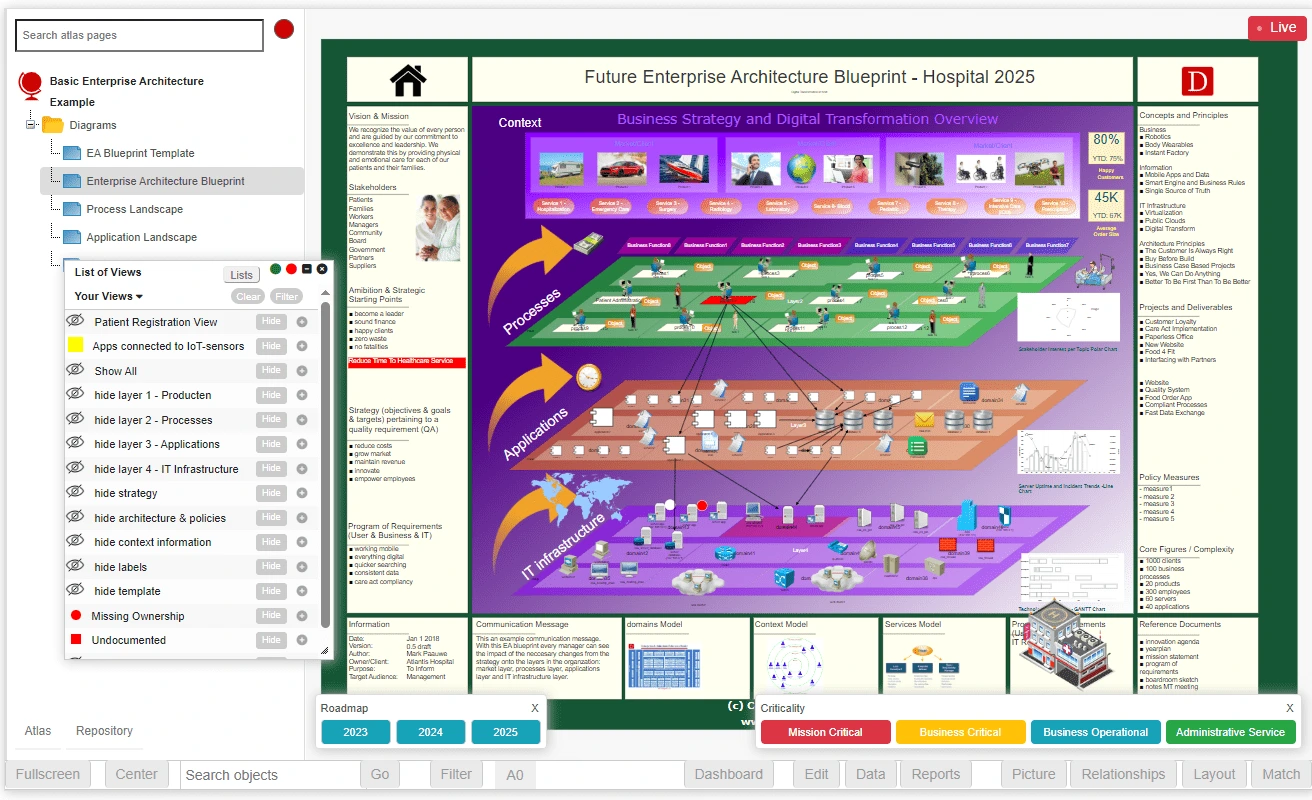
Create Enterprise Architecture Blueprints in the Viewer.
How to Create a Dynamic Enterprise Blueprint Diagram?
What do enterprise architecture blueprints in industries look like? What information is on a blueprint? What is it used for? Let us define blueprints for enterprise architecture.
Our starting point is we have a filled-in EA Diagram Statement.
It then takes the following steps to create an Architecture Blueprint like the one above:
- Create a folder structure in the Architecture Repository.
- Enter or import entity classes, entity types, entities like the owner/client, stakeholders, architectures, enterprise structures, concepts, principles, processes, applications, requirements, etc.
- Define an enterprise metamodel (optionally based on a standard such as IEEE1471, TOGAF, etc.) and enterprise model.
- Relate entities, classes, and types, thus creating the metamodel and model.
- Take care of the viewers, viewpoints, and views
- Draw shapes on the visualization canvas in the Visual Designer. Draw one shape per type of entity and set up the draw pattern. This visualization canvas will be a template.
- Link the visualization to the view. If the view contains multiple occurrences of a given entity type, the visualization uses the drawing pattern to render all occurrences on the canvas.
- Link the view to the viewpoint. The viewpoint defines the entities, attributes, and relationships of interest to specific viewers (stakeholders).
- Link the view to the model (the viewpoint is linked indirectly to the model).
- Link the model to the structure, object, subject, system, or other entity it is a model of.
- In the Visual Designer, you can view the dynamic Blueprint.
Discover More
- Read all about how to use Enterprise Architecture as Strategy and Strategic Planning for creating blueprints for the organization
- Solutions > Digital Transformation
- Solutions > Cyber Security
- Visualizations > Enterprise Transformation Roadmap
- Software > EA Tool
- Interesting links about the Blueprint Enterprise Architecture of the Government of Australia
- Blueprint on Wikipedia